When you try to Add people to a Group in WhatsApp, you are provided with the option to add them from your Contacts List or Add them by sending an invitation Link.
While the first method is suitable for creating WhatsApp Groups containing a limited number of family members and friends; who are already available in your Contacts List, the second method allows you to invite a large number of people to your WhatsApp Group who are not available in your Contacts List.
Hence, if you are creating a large WhatsApp Group; you can add up to 1,024 people to the Group; without adding any of them to your Contacts list by sending them an invitation link or a QR Code to join the Group.
Related: How to Check If WhatsApp Link is Safe to Open.
Add People to WhatsApp Group Without Saving to Contacts
- Send Invitation Link: You can invite anyone that is on WhatsApp to join your Group by sending them an invitation link via WhatsApp, Email, iMessage and other available methods.
- People Tap the Link: When people receive your invitation; they can view the Group by tapping on the link and join the Group.
- Your Contacts List: When people join your WhatsApp Group; their phone number is not automatically added or saved to your Contacts List.
- Their Contacts List: Similarly, your phone number or name is also not automatically added to the Contacts List of the people that join your WhatsApp Group.
1. Add People to WhatsApp Group By Sending Invitation Link
Make sure that you have Admin rights to the WhatsApp Group and follow the steps below to Add people to WhatsApp Group without saving them to your Contacts List.
1. Open WhatsApp > switch to Chats tab > select the WhatsApp Group to which you want to Add people.
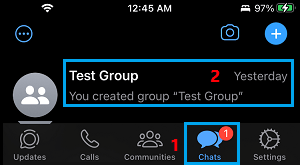
2. On the Group screen, tap on the Group Name.

3. On the Group Info screen, scroll down and tap on Invite via link or QR code option.
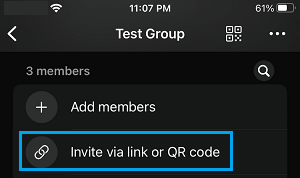
4. On the next screen, scroll down and select Share link option.
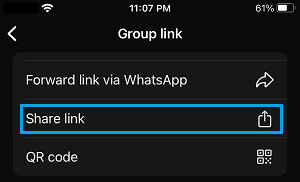
5. On the Sharing menu that appears, you can select Mail, Messages or any other available App to send the WhatsApp Group Invite link.
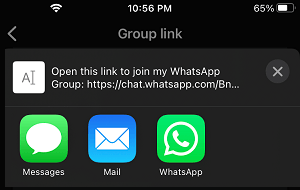
Once the Group Invite Link reaches your recipients, they will be able to see the Group by tapping on the Link and Join the Group.
2. Add People to WhatsApp Group By Sending QR Code
Similarly, WhatsApp provides the option to invite people to Groups by sending them a QR Code.
1. Open the WhatsApp Group to which you want to invite people > Tap on the Group Name.
2. On the Group Info screen, scroll down and select Invite via link or QR code option.
3. On the next screen, scroll down and select the QR Code option.
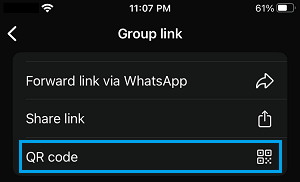
4. On the QR Code screen, tap on the Share icon located at top-right corner of the screen.
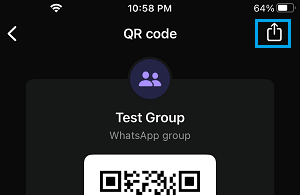
5. On the sharing menu that appears, you can select Messages, Email or any other available app to send the QR Code.
Revoke WhatsApp Group Invite Link
The disadvantage of adding people to WhatsApp Group by using Link or QR Code is the possibility of unknown or undesirable people joining your WhatsApp Group. However, you can easily minimize the chances of WhatsApp Group Invite link or QR Code being misused by resetting the link.
1. Open the WhatsApp Group and tap on Group Name.
2. On the Group Info screen, scroll down and tap on Invite via link or QR code option.
3. On the next screen, scroll down and tap on Reset Link option.
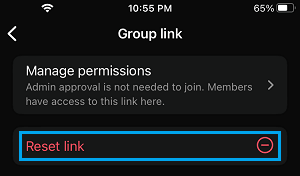
4. On the confirmation pop-up, tap on Reset Link to confirm.
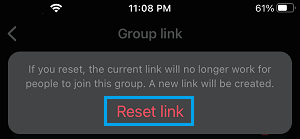
Once you tap on Reset Link, the current link will stop working and people won’t be able to misuse the Link.